Irvan← Selected work

Jabar Digital Service · Case study

A government form builder built for real-world workflows.

Jabar Form gives public-service teams one place to compose, publish, and manage forms that can be simple for respondents without being simplistic for the people operating them.

Role: Full-stack engineerFocus: builder, response flow & servicesJabar Digital Service

The assignment

Turn a form request into a durable, self-service product.

Product
Jabar Form
Contribution
Builder UX, survey flow & API services
Primary tools
Next.js, FastAPI, MongoDB
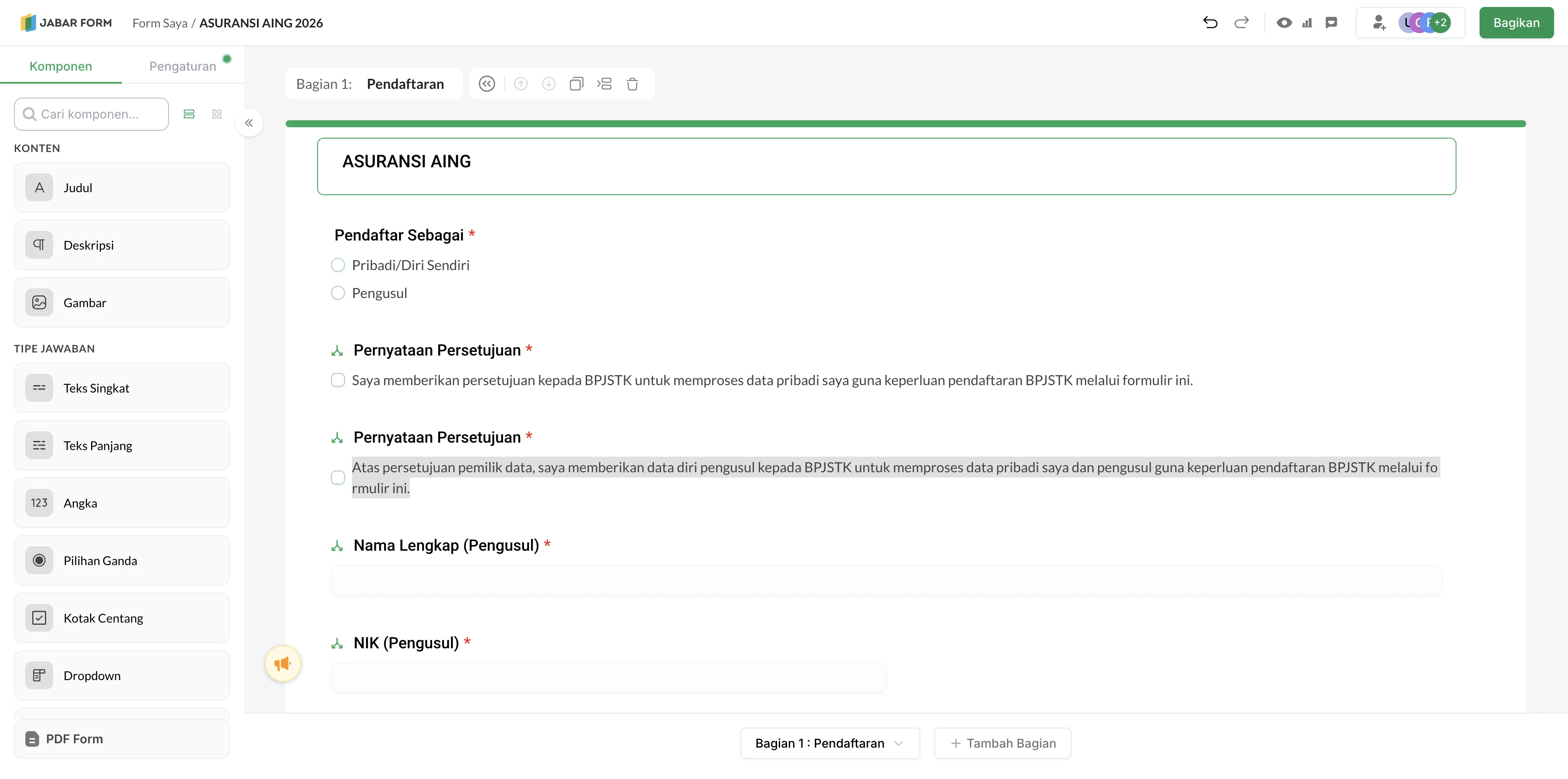
Jabar Form builder showing its component library, editable form canvas, question settings, and publish control.
The builder puts the form structure, question library, and publishing controls in one working surface.

The product

Not just a survey. A system for collecting usable public-service data.

Government teams often need forms for programmes, registrations, field collection, internal operations, and public feedback. The work does not stop when someone drags a question onto a canvas: a form needs a clear respondent path, the right validation and routing, controlled sharing, and a way for operators to understand the answers afterwards.

Jabar Form brings those steps together. The same product surface handles form authoring, publishing, responses, reporting, exports, and integrations—so a team does not need to stitch together a generic builder and a separate operational process.

Visit Jabar Form

01 / The system behind a form

Build once.
Operate end to end.

I worked across the paths that make a builder useful after the editor closes: reliable form definitions, a respondent experience, answer handling, and operational views for the team behind it.

01

Compose

Structure a form from reusable question types, sections, settings, and themes.

02

Guide

Use validation and conditional logic to keep each response path relevant.

03

Publish

Share through links, email, QR codes, or an embedded form.

04

Understand

Manage respondents, analyse answers, and export data for follow-up work.

The advantage is the continuity between authoring and operation: each field, rule, and section is carried through to how answers are captured and used.

The builder

Enough control for complex forms, without turning the editor into a specialist tool.

The builder makes form composition visual, but its real value is in the detail behind each component. A creator can set a question’s format, required state, limits, and tailored behaviour, then group related questions into sections rather than leaving respondents to work through one long, flat page.

I worked on builder behaviour and reliability across the client and service layers—from drag-and-drop/editor interactions to saving sections and logic. The goal was not simply adding controls: it was making changes predictable, so a form remains coherent when its questions, options, or routing evolve.

01

Structured questions

Short and long text, number, choice, date, time, phone, email, ratings, and sections.

02

Evidence in the response

File uploads, camera capture, images, links, and signatures when a form needs more than text.

03

Local context

Address, location, and administrative-area inputs for public-service workflows that depend on where something happened.

04

Rules that adapt

Question and section logic, including API-backed rules, so a respondent sees the next relevant step.

02 / The routing decision

Form and section logic

Ask less.
Learn more.

One fixed questionnaire makes every respondent do the same work. Logic allows the form to respond to an answer instead of forcing irrelevant questions on everyone.

Question“Which service do you need?”
Report an issueRequest information
Show location and evidence fields
Show the relevant information path
The benefit

Respondents see a shorter, more relevant path; teams receive answers in a structure that fits the workflow behind the form.

The engineering detail

Logic exists at both question and section level, with API-backed rules available where a form needs to react to linked data.

The operational side

A useful form has a life after “Publish”.

The product also gives form owners a home for the work that follows collection: finding their forms, checking activity, managing response data, and preparing it for reporting or another system.
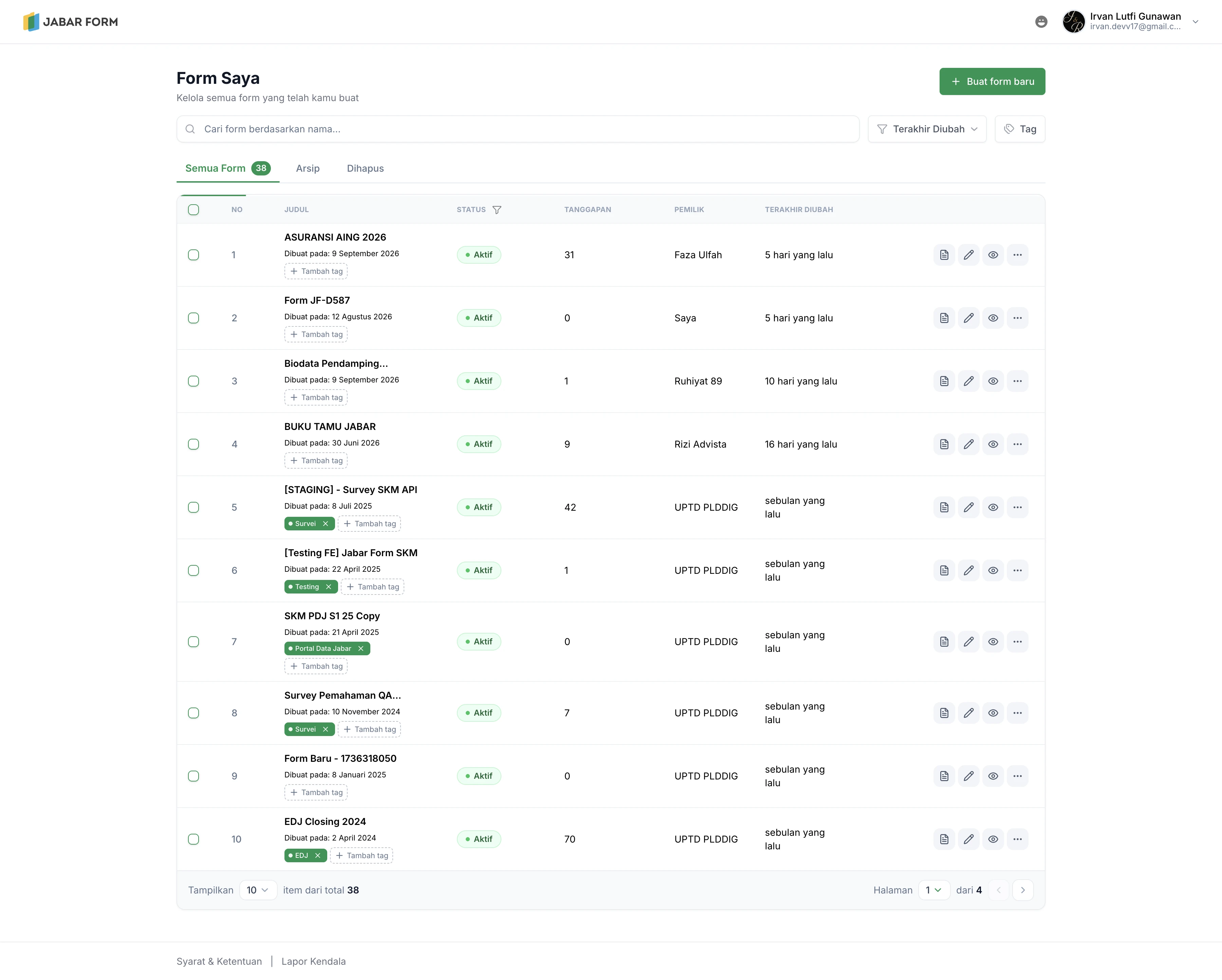
Jabar Form dashboard showing a creator workspace for managing forms and response activity.
The creator workspace keeps owned forms and operational follow-up close to the builder.

My full-stack role

Make the form experience dependable from canvas to collected response.

I contributed across the frontend and FastAPI service layer, rather than treating the builder as an isolated screen. That included stabilising builder drag-and-drop and modal behaviour, handling logic changes safely, and improving response, export, dashboard, administration, and tagging flows.

That end-to-end view matters for form software. A visually polished editor is not enough if a hidden field keeps an invalid value, an export is fragile, or operators cannot find the right form and answers later. The work was about reducing those seams across the product.

  • Compose reusable form structures with questions, sections, settings, and PDF-related tools.
  • Support conditional paths, validation, linked data rules, and response-safe changes.
  • Publish through direct links, email, QR code, and embeds.
  • Carry answers through respondents, analytics, exports, storage, and integrations.

What makes it different

A form builder designed around the whole job.

More than simple inputs

It can collect structured answers alongside files, signatures, images, camera captures, location, and address context—useful when a workflow needs evidence, not just a checkbox.

Built for public-service context

Question variants, routing, address and geographic inputs, plus controlled sharing let one platform cover workflows that are too specific for a one-size-fits-all survey.

Closer to the outcome

Forms, responses, reporting, export, and integrations live in the same product journey, reducing the manual handoff from collection to action.

Reflection

A form is only simple when the system behind it has done the hard work.

Jabar Form reinforced a product lesson I value: complexity does not disappear when an interface looks clean. It has to be handled deliberately in the data model, validation, conditional states, publishing routes, and the way operators get answers back.

Working across those layers made the product stronger. It gave creators room to build the form their workflow actually requires while preserving a respondent experience that stays focused and understandable.